

Intuitive UI for Robot Framework
Nominal Connect provides high-performance, low-code UI for Robot Framework test applications
What is Robot Framework?
Robot Framework is one of the most versatile automation tools in the world. Over the past 20 years, it has served everyone from lone test engineers to enterprise‑scale teams.
Robot Framework is an open source Test Executive for acceptance testing, acceptance test driven development, behavior driven development, and robotic process automation – instead of developing test executives in-house or buying expensive off-the-shelf products. Robot Framework can be used in distributed, heterogenous environments where interfacing with many different technologies is necessary. At its core, it is an automated test runner that supports process and component validation.
How is Robot Framework different?
Keyword-driven, tabular syntax – Tests are written in plain text tables rather than code, readable as executable specs. Easy readability makes Robot Framework quick for onboarding and iteration.
Extensible library architecture – Robot Framework includes over 200 libraries covering most domains. Plus, anything the built‑in libraries don’t cover can be added via Python, Java, or .NET. A “batteries‐included plus easy to add more” ecosystem
Integration & execution – Robot Framework keywords can call external tools, CLI commands, REST endpoints, UI drivers, or custom scripts in almost any programming language. This leads to extremely versatile execution.
Cross‑platform – Robot Framework runs wherever Python does and can even orchestrate tests on remote hosts.
Common real‑world use cases
1. Web UI regression and End-to-End flows
SeleniumLibrary and the newer Browser library give teams the power to validate complex browser interactions across Chrome, Firefox, Safari, and mobile emulation.
2. API & micro‑service verification
Libraries such as RESTinstance, RequestsLibrary, and HTTP deal with REST/GraphQL/SOAP calls, enabling quick, data‑driven contract and integration tests that slot straight into nightly pipelines.
3. Mobile app testing
AppiumLibrary exposes Android and iOS devices (real or emulated) to the same keyword syntax, so a single test suite can drive both platforms with minimal duplication.
4. Robotic Process Automation
With the RPA Framework libraries, Robot Framework steps outside classic testing to automate Excel, PDFs, ERP systems, and web portals.
5. Hardware Acceptance Testing
Because keywords can call serial ports, SSH sessions, or proprietary tools, hardware teams use Robot Framework to validate firmware flashes, sensor data, or even RF measurements in continuous delivery setups.
A five‑line syntax example
*** Settings ***
Library    Browser    # Playwright‑powered browser lib

*** Test Cases ***
Login And See Dashboard
    New Browser    chromium
    New Page    <https://example.com>
    Click    text=Login
    Fill Text    id=username    johnsmith@example.com
    Fill Text    id=password    password
    Click    text=Submit
    Wait For Elements State    text=Dashboard    visible
    Should Contain    ${page.title}    Dashboard
    Close Browser
Even without much background, these test files are still easy to read.
Nominal Connect as UI for Robot Framework
Nominal Connect is our test application framework for real-time automation, analysis, and data capture at the edge. Engineers can easily create custom visualizations and control interfaces for their common tests, with seamless integrations with existing frameworks and libraries. It provides a high-performance, low-code UI to operationalize Robot Framework.
Let’s explore one application of this system in detail: Motor Response Validation.
By merging Nominal Connect and Robot Framework, we are able to both run validation tests and visualize the behavior of our devices. Our system, outlined graphically in Fig. 2, will attempt to connect a Laptop running Nominal Connect to both an Arduino UNO and a FLIPSKY ESC. The Laptop will proceed to send (pin HIGH/LOW) commands to the Arduino and test whether the messages are being sent and received (read HIGH/LOW state of pins). If successful, the Laptop will send actuation commands to the ESC and ensure that the motor spins using the built-in Hall sensors.
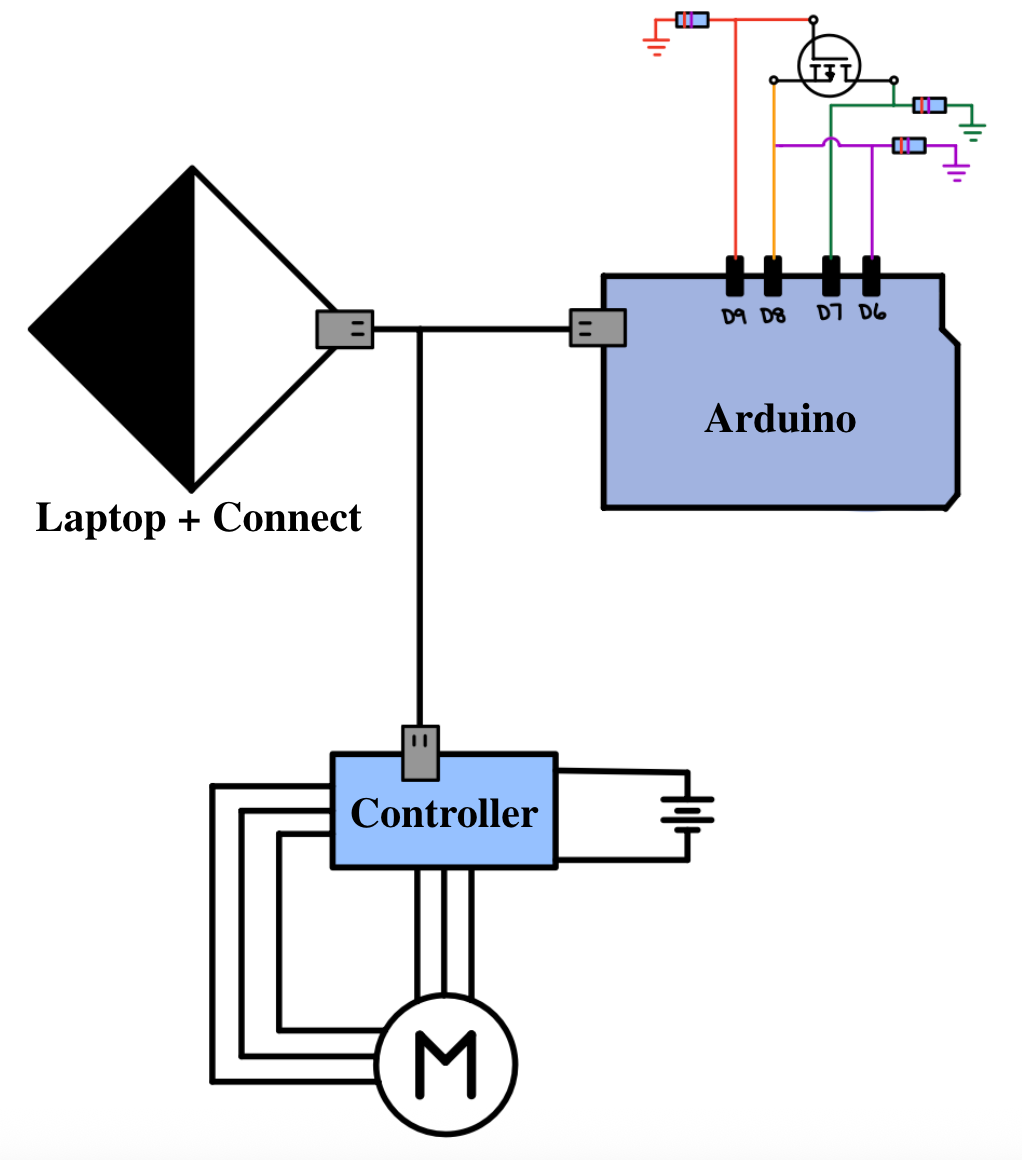
Figure 2: Wiring Diagram for the test suite. Pin D8 on the Arduino is the message send, Pin D9 is the interrupt, pin D6 checks for message send status, and pin D7 checks for message reception. When Pin 8 is high (message send) and Pin 9 is low (message interrupt), the MOSFET is on so both Pin 6 (check message send) and Pin 7 (check message received) are high. If both Pin 8 and 9 are high, then the MOSFET is off and Pin 7 reads low (Pin 6 stays high). Note that the motor controller and Arduino are configured to two different ports in Connect - the visual representation is a simplification.
The tests we are looking to run are the following:
Can we connect our system to an Arduino?
Can we connect our system to a VESC?
Can we send commands to the Arduino?
Can we read commands to the Arduino?
Can we see the motor spinning if we send an actuation input?
To do this we created the following Connect App where you can configure the test UI with a .yaml:
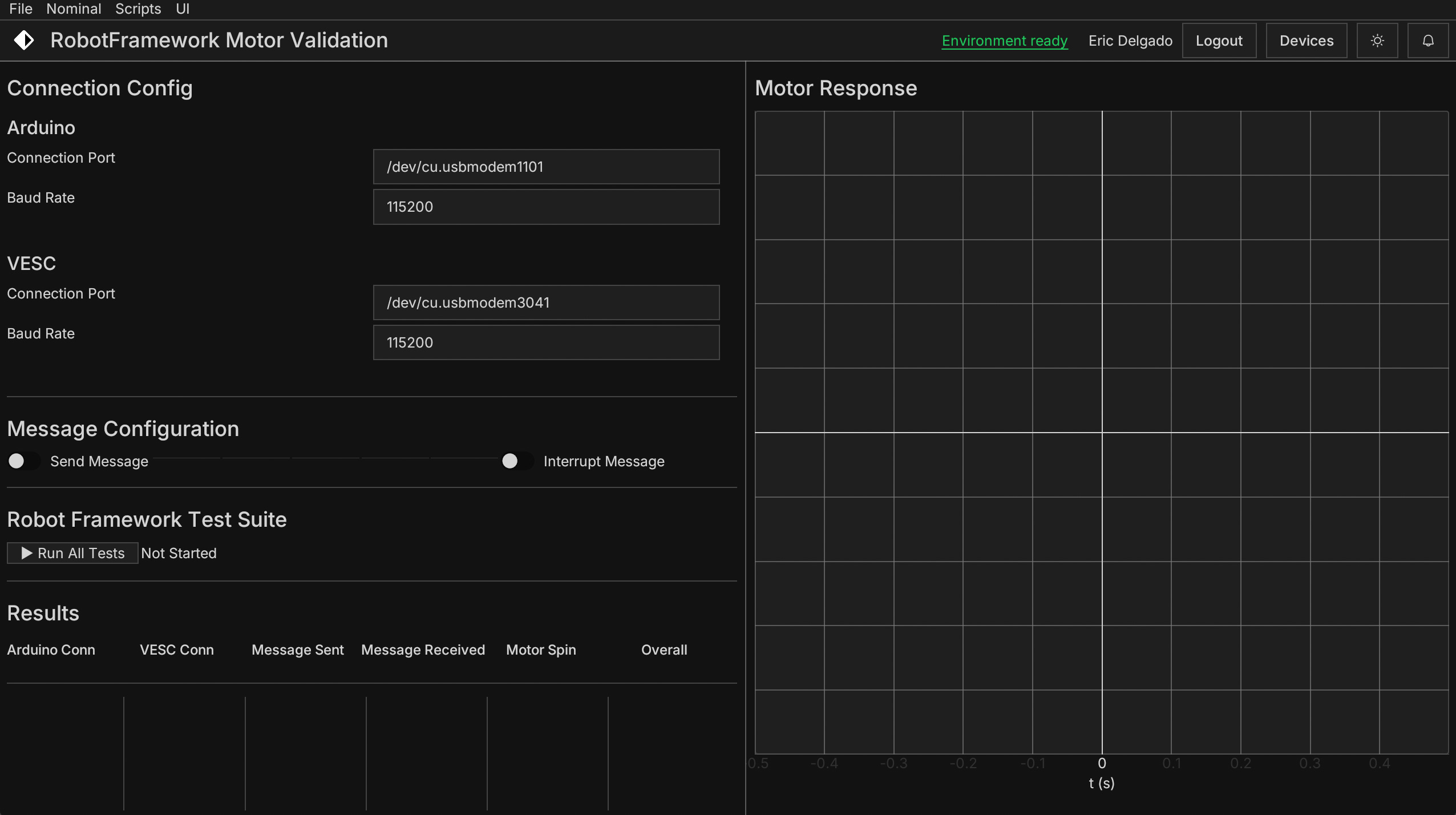
This app provides space for the user to define the Arduino and VESC connection ports and baud rates, as well as toggle switches to open the communication lines and inject data interruption. Once all the ports are configured and the switches set, the user can run the suite of Robot Framework tests to validate whether their system is working as expected.
Robot Framework turns every public method into a keyword whose name is the method name with underscores changed to spaces - test_arduino_connectivity → “Test Arduino Connectivity” is therefore mapped automatically.
At runtime, Robot will:
Start and run Setup Test Environment
Run through each test case by calling each function’s matching keyword
Assert whether the function result is True/False
Tear down the test environment, closing the ports
Now that we understand how the process works, we can look at a couple of test runs with different system conditions:
Test Runs:
No arduino or VESC connectivity:
Message interrupt:
Message sent, no VESC connectivity:
All tests passed:
Intuitive, scalable test automation
Robot Framework provides sophisticated test automation without the complication. Its plain‑text, keyword‑driven and expansive library ecosystem lets the same suite validate everything from web UIs to hardware‑in‑the‑loop rigs. Pair it with Nominal Connect for a high‑performance, low-code UI on top of the test application.
For more information about Robot Framework, visit here.